

How Roasters Are Using AI to Design Custom Coffee Bags in 2026
Something shifted in the packaging design world around 2023 and it has been accelerating ever since. Adobe Firefly became part of the Creative Cloud suite that professional designers already used every day. Midjourney went from a beta novelty to a serious visual tool with millions of active users. Canva added AI image generation inside the platform that small businesses were already relying on for social media and marketing. By 2025, a micro-roaster in Austin or a two-person operation in Portland could generate a dozen coffee bag concept directions in an afternoon without spending a dollar on a designer. AI coffee bag design moved from a curiosity to a genuine part of how small brands build their visual identity. That shift has a catch. Generating an image that looks like a coffee bag and producing a coffee bag that actually prints are two entirely different challenges. Most roasters experimenting with these tools do not know where that line is, and that gap is costing them time and creating scope confusion with their packaging partners. Here is a clear-eyed look at what works, where it falls apart, and what professional print still demands.The AI Design Wave Has Hit Small Roasters
The barrier to generating high-quality visual concepts dropped dramatically between 2023 and 2025. Before these tools existed, a small roaster who wanted to explore three or four brand directions had two options: hire a designer and pay for concept rounds, or settle for a stock bag with a label. Neither was great. The designer route was expensive for a brand with no guarantee the coffee would sell. The stock bag route meant every visual decision had already been made by someone else. AI generation changed the math. A roaster can now spend an afternoon prompting Midjourney or Firefly, generate dozens of visual directions, and walk into a conversation with a packaging supplier holding a folder of actual visual references instead of vague descriptions. That is a real improvement in how the early design process works, and it has lowered the floor for small brands in a meaningful way. The three platforms that come up most in small roaster conversations are Adobe Firefly, Midjourney, and Canva AI. Firefly integrates into Photoshop and Illustrator, which makes it appealing for brands already working inside Adobe products. Midjourney runs through Discord and produces some of the most stylistically detailed, atmospheric imagery available to any consumer tool. Canva AI sits inside a platform most small businesses already use, making adoption nearly effortless. Beyond those three, DALL-E 3 inside ChatGPT, Stable Diffusion, and Leonardo AI each have dedicated user bases with different aesthetic tendencies and prompt behaviors.Where AI Genuinely Helps with Coffee Bag Artwork
Concept generation is the clearest win. A roaster who knows they want something "dark, textured, with a nod to Ethiopian origin and a hand-drawn botanical feel" can prompt Midjourney and have ten visual directions to react to in fifteen minutes. That feedback loop compresses a process that used to take days of back-and-forth with a designer into a single afternoon of independent exploration. It is fast, low-cost, and the output is concrete enough to share and discuss. Style iteration is another genuine strength. The same brand concept can be generated in a vintage hand-illustrated style, a bold modernist style, a minimal Scandinavian style, and a maximalist illustrative style in sequence without committing to a designer's time or a production budget. Roasters who are still finding their visual identity find this especially valuable. You do not have to know exactly what you want before you start. You just have to react, and most people are much better at reacting to a visual than describing one from scratch. Color palette exploration works well in the same way. AI-generated images give roasters a concrete visual reference for how color combinations actually feel when applied at the scale of a bag, which is more useful than staring at a color wheel. When you share those references with a custom coffee bags production partner, the briefing conversation becomes faster and more specific because both sides are reacting to the same visual reference instead of interpreting a description differently. Here is where AI tools consistently deliver real value in the packaging design process:- Generating multiple visual directions quickly without committing to a designer retainer or a specific aesthetic before you are ready
- Building a visual reference board that communicates brand tone and feel to a packaging partner before a production project opens
- Testing color combinations and broad style choices in a low-cost, low-stakes environment
- Exploring how different compositional approaches, illustration styles, or typographic moods might fit the brand personality
Where AI Runs Into a Wall
The gap between what looks right on screen and what actually prints correctly on a bag is significant, and it starts with the file itself. AI-generated images are raster files made of pixels. Every commercial coffee bag printer, whether running digital packaging or rotogravure production, requires vector-based artwork. Vector files are built from mathematical paths that scale to any bag dimension without losing sharpness. A Midjourney image exported at 72 DPI looks crisp on Instagram and blurry and unusable when placed inside a print-ready dieline at full bag dimensions. That is not an edge case. It is how every AI-generated image performs under print production specs. Color is the next failure point. Screens display color in RGB, a model built for light-emitting displays. Commercial printing uses CMYK, a model built for ink on substrate. Colors that look vibrant and saturated in Midjourney, Firefly, or any other AI tool will often shift, flatten, or lose intensity when converted to a CMYK print profile. Highly saturated neon greens, electric blues, and vivid oranges are common casualties of that conversion. Professional printers work in calibrated CMYK environments with tested ink systems and specific substrate profiles. No AI image generator accounts for any of that.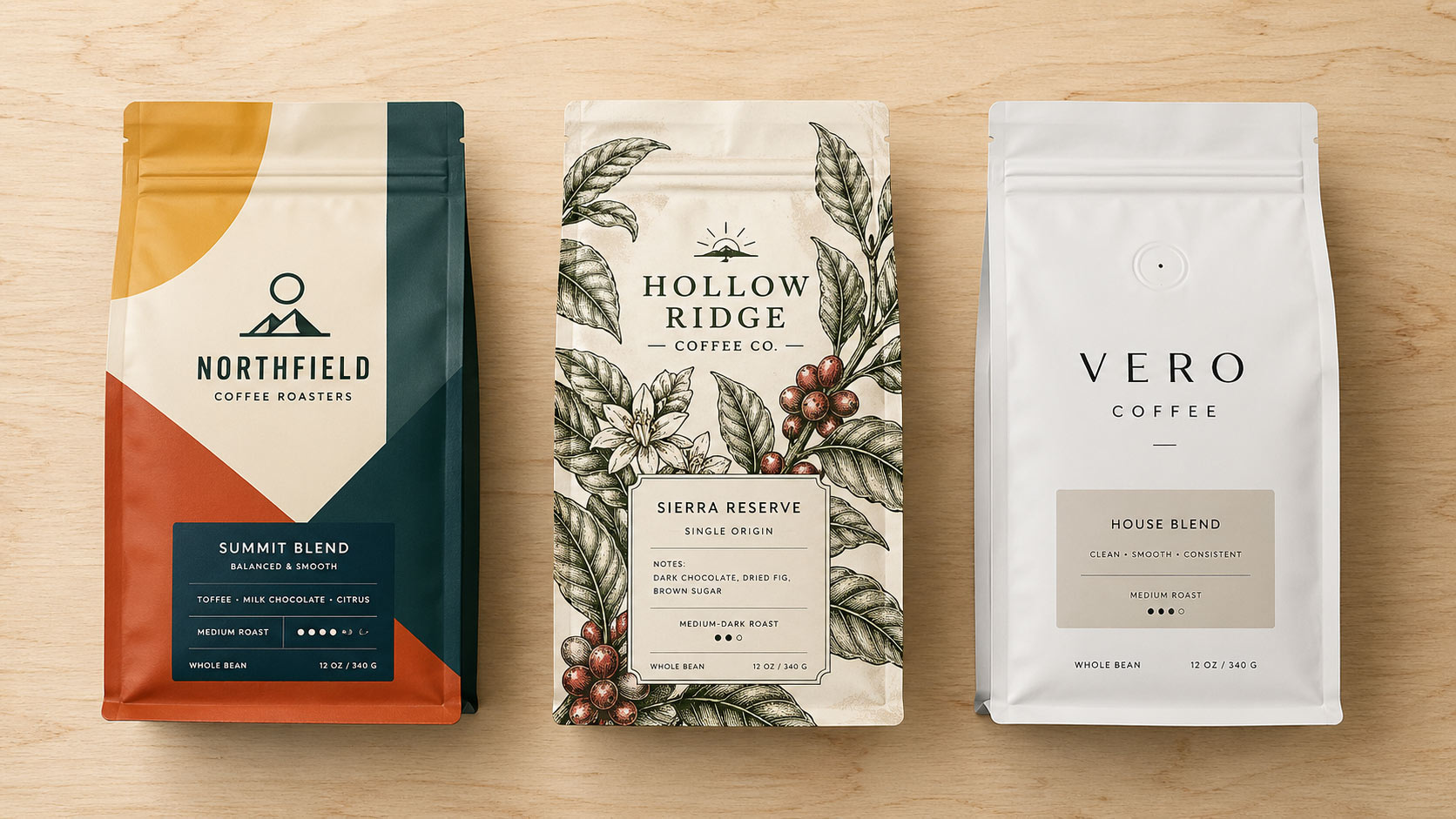 Typography is where AI tools fail most consistently for packaging purposes. Midjourney in particular tends to generate imagery where text looks typographically plausible at a glance but is garbled, misspelled, or nonsensical when read closely. More importantly, even when AI-generated text looks correct, it is baked into the image as pixels. It cannot be corrected, reflowed for a different bag size, adjusted for kerning, or set in the actual brand font. Every word on a finished coffee bag has to be set as live, editable vector type by a production artist. Borrowing rendered type from an AI image is not a shortcut. It is a dead end.
Dielines are the final and most consequential barrier. A dieline is the technical blueprint of a specific bag style, showing the exact cut lines, fold lines, bleed areas, and safe zones required for correct production. AI tools have no concept of dielines. An image that looks perfectly composed in Midjourney will not account for the seal area at the top of a stand-up pouch, the side gusset fold, the bottom panel structure, or the bleed that extends beyond the printable area. Artwork that ignores the dieline will not print correctly regardless of how strong it looks as a digital image.
The problems AI images create in print production are consistent enough to know before you invest time in them:
Typography is where AI tools fail most consistently for packaging purposes. Midjourney in particular tends to generate imagery where text looks typographically plausible at a glance but is garbled, misspelled, or nonsensical when read closely. More importantly, even when AI-generated text looks correct, it is baked into the image as pixels. It cannot be corrected, reflowed for a different bag size, adjusted for kerning, or set in the actual brand font. Every word on a finished coffee bag has to be set as live, editable vector type by a production artist. Borrowing rendered type from an AI image is not a shortcut. It is a dead end.
Dielines are the final and most consequential barrier. A dieline is the technical blueprint of a specific bag style, showing the exact cut lines, fold lines, bleed areas, and safe zones required for correct production. AI tools have no concept of dielines. An image that looks perfectly composed in Midjourney will not account for the seal area at the top of a stand-up pouch, the side gusset fold, the bottom panel structure, or the bleed that extends beyond the printable area. Artwork that ignores the dieline will not print correctly regardless of how strong it looks as a digital image.
The problems AI images create in print production are consistent enough to know before you invest time in them:
- Raster pixel-based files at screen resolution do not meet print specs for any commercial bag printer
- RGB color profiles produce unpredictable color shifts when converted to CMYK press output
- AI-generated text is pixel-based, often inaccurate, and cannot be corrected or reflowed without rebuilding the type layer entirely
- No AI tool understands dielines, bleed requirements, safe zones, or bag-specific structural constraints
What Professional Print Setup Actually Requires
Getting from a strong visual concept to a finished bag requires a specific set of technical deliverables. Understanding what those are helps you use AI output as a starting point rather than a finished product handed off to a printer. Print-ready artwork for a coffee bag is typically delivered as an Adobe Illustrator file built to actual production dimensions. All fonts must be outlined, meaning converted from editable live type into fixed vector shapes, so the printer does not need your specific font files to open or output the document correctly. All embedded images must be high-resolution, generally 300 DPI or higher at actual print size. Color must be specified in CMYK or using Pantone spot color references for any color that requires exact consistency across print runs or between production batches. The dieline must be either provided by the printer or embedded as a guide layer in the artwork file. Every bag style has its own dieline, and the artwork must be positioned within that structure so the visual design lands correctly on the finished pouch. Seal areas at the top, bottom, and side panels are production zones where ink cannot print reliably. Text and critical visual elements must sit inside the safe zone, typically a few millimeters inside the outer print boundary, to account for slight registration variance during production. For eco-friendly digital printing, the same file specifications apply. Digital presses are more flexible on minimum quantities and turnaround times, but they require the same production-ready artwork as any other commercial print method. The accessibility and low minimums of digital printing do not lower the bar for artwork preparation. They just make the right volume more attainable for a growing brand.Using AI as a Starting Point, Not a Finish Line
The roasters getting the most value from AI design tools are using them for concept generation and visual exploration, then handing the creative direction to a designer or production artist to build the print-ready file. That workflow works well because the briefing process is faster, the design direction is already clear, and the designer spends less time on broad concept rounds and more time on the production details that actually matter. If you are working with a packaging partner who offers design services, share your AI outputs as a reference board, not as final artwork. Be specific about what you like in each image. "I want this color palette" or "this level of detail in the illustration is where we are heading" gives a production artist actionable direction. Handing over an AI image and asking it to be printed directly creates a scope problem and a production problem simultaneously. For roasters who also manage food packaging products beyond coffee, the same principle carries across product types and bag styles. AI is a brainstorming tool that compresses the early exploration phase and makes briefing conversations more productive. Professional print production is the step where the concept becomes something that can actually be filled, sealed, and shelved. A practical workflow that uses AI effectively at each stage:- Generate 15 to 20 concept images across at least three distinct style directions before any design conversations begin
- Pull the 3 to 5 strongest images as a reference set and write specific notes about what you like in each one
- Share that reference set as a brief supplement, not as final artwork, when opening a packaging project with a production partner
- Ask your packaging supplier for their dieline files and print spec requirements before any artwork is started
- Budget for a production artist to build the print-ready Illustrator file using AI-generated references as creative direction, not as source material
The Prompt Is the Starting Line
AI design tools are one of the most genuinely useful things to happen to small roasters in years. The ability to explore a dozen brand directions in an afternoon, build a real visual reference board without paying for concept rounds, and walk into a packaging conversation with something concrete to react to has shortened the path from idea to production in a measurable way. Adobe Firefly, Midjourney, and the tools that follow them will keep improving, and the imagery they produce will keep getting more detailed and more persuasive. But the finish line for a custom coffee bag is not a digital render on a laptop screen. It is a physical bag that passes press checks, holds its color across a production run, and reads clearly on a retail shelf or a cafe counter. Getting there requires file specifications, dieline accuracy, color profiling, and production expertise that no prompt generates and no AI tool currently provides. The gap is real, and closing it still requires people who understand how ink, substrate, and lamination behave together on a finished pouch. The roasters using AI coffee bag design tools well are treating them as the starting line. They arrive at production conversations better prepared, move through concept rounds faster, and end up with finished custom coffee bags that match the visual intent they had from the beginning. That is exactly the role these tools are built for, and it is a strong one when the expectations are set correctly from the start.Why Us?
 3x SCA Best New Product Award Winner
Industrial Compostable Packaging
Your Very Own White Label Mobile App
Pono Collective: Providing Coffee Education
Lower MOQs With Our Digital Print Process
Setting Trends While Elevating Your Brand
Contact Our Team!
Other Blogs of Interest


Your Custom Coffee Bag Deserves Great Artwork: Brief a Graphic Designer the Right Way
Why the Brief You Write Is More Important Than the Designer You Hire A great designer working from a poor brief will still produce work that misses the mark. An average designer working from a thorough brief has a much better shot at nailing it on the first try. Think of the brief as a map. The mor...

Kraft Coffee Bags: When Natural Paper Packaging Is the Right Call for Your Brand
Walk through a specialty coffee shop or a Saturday farmers market, and the kraft coffee bag tends to be the one that pulls your attention first. The brown paper exterior, matte and textured, gives a product a handcrafted quality that polished foil bags do not always match. Kraft coffee bags have earned...


Custom Coffee Bags Explained: Stand Up Pouches
Stand Up Pouches have been a favorite for roasters and customers for many years. Its design to stand upright on shelves offers the perfect balance of practicality and presentation for many businesses. Why Choose Stand-Up Pouches? This bag style is known for its "more bang for its buck" due to it...


Custom Packaging: Rotogravure or Digital Printed Coffee Bags?
The very first step is knowing which print process to choose. Here at Savor Brand we offer two types: Digital Rotogravure Both print print processes are great options for custom coffee bag packaging and we're here to help guide you towards the best print option for your business needs! ...